Basic · LESSON 05 OF 06
5. Instructions, fees, and finality
By the end, you can explain what signing, submitting, confirming, and finalizing mean.
Optional reading history is saved only in this browser. It is not a scored checkpoint or exam result.
In this lesson9 field notes · practice · sources · checkpoint
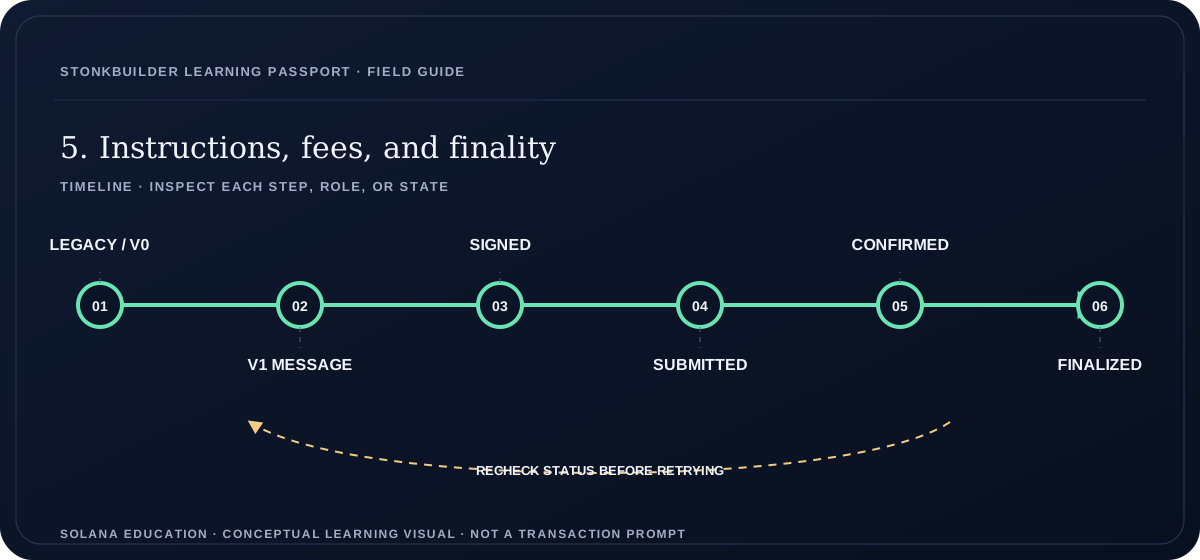
Read a text version of this diagram
A transaction begins as a message in a supported format, receives all required signatures, and is submitted to a cluster. Confirmation indicates observed execution at a commitment level; finalization gives stronger ledger confidence. A transaction can fail atomically while a network fee is still charged. Keep format, signature, cluster, execution result, and fee evidence distinct.
- LEGACY / V0
- V1 MESSAGE
- SIGNED
- SUBMITTED
- CONFIRMED
- FINALIZED
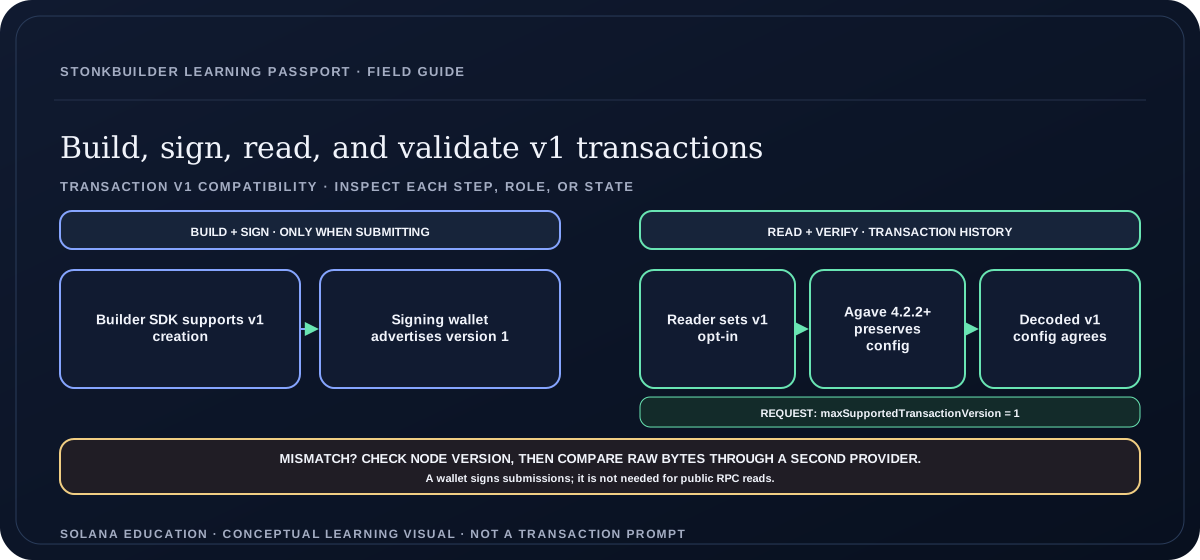
Read a text version: Build, sign, read, and validate v1 transactions
The submit path requires a builder SDK that supports v1 and a signing wallet that advertises version 1 when the application asks it to sign. Public transaction reads do not require a wallet: the RPC request must set maxSupportedTransactionVersion to 1. An Agave node at version 4.2.2 or later preserves the v1 transactionConfig; older nodes may downgrade the result and zero its configuration. Compare the decoded version and configuration, check the node version, then compare raw transaction bytes through a second provider if they disagree.
- Builder SDK supports v1 creation
- Signing wallet advertises version 1
- Reader sets v1 opt-in
- Agave 4.2.2+ preserves config
- Decoded v1 config agrees
The unit of execution
A transaction carries instructions plus the accounts and signatures required for execution. Multiple instructions can form one atomic transaction. If instruction execution fails, its state changes are rolled back, although the transaction may still incur a fee. A successful request to an RPC endpoint is not the same as a successfully executed transaction.
Freshness and confirmation
Transactions commonly include a recent blockhash and have a limited validity window. Processed, confirmed, and finalized represent different commitment levels. Applications should choose and document a confirmation policy. A timeout means the client lacks a conclusive result; it does not by itself establish failure.
Avoid duplicate intent
After a timeout, inspect the signature and validity window before preparing a replacement. If you immediately create another transaction with the same business purpose, both may execute. A certificate service needs an idempotent claim record and on-chain duplicate prevention, not just a disabled button.
Confirmation has levels and expiry
A recent blockhash limits how long a normal transaction remains eligible for processing. A client should retain the signature and last valid block height, then distinguish a pending transaction from an expired one. RPC status can be temporarily absent even when a transaction may still land, so a null response is not proof of failure. Solana commitment levels describe how much confirmation a query requires; processed, confirmed, and finalized are not interchangeable labels. Applications should not announce success before their stated threshold is reached. When a submission is delayed, query status and transaction details on the same cluster, respect block-height expiry, and reconcile again before offering a replacement action. This prevents duplicate sends caused by treating a slow response as a rejected transaction.
Understand the all-or-nothing boundary
A transaction contains one or more instructions and the signatures required for those instructions. When execution fails, Solana reverts the transaction’s state changes together; earlier instructions in the same transaction do not remain partially applied. The fee can still be charged for a failed transaction. That distinction matters when a mint attempt errors: the learner may have paid a fee without receiving a credential. Verify the transaction error and asset state before telling the learner what happened. A user clicking Approve proves only that the wallet was asked to sign; it does not prove that execution succeeded.
Track validity and confirmation separately
A recent blockhash gives a transaction a bounded lifetime. Solana documentation currently describes a 150-slot processing window, but applications should use the last-valid-block-height information returned for their specific transaction instead of building a timer from a memorized duration. “Processed,” “confirmed,” and “finalized” express different commitment levels. Decide which level your application requires and label it honestly. A timeout means the client has not obtained a conclusive response; the transaction could still land. Before creating a replacement, look up the original signature and validity state so one learner action does not accidentally create two assets.
Estimate every cost before wallet approval
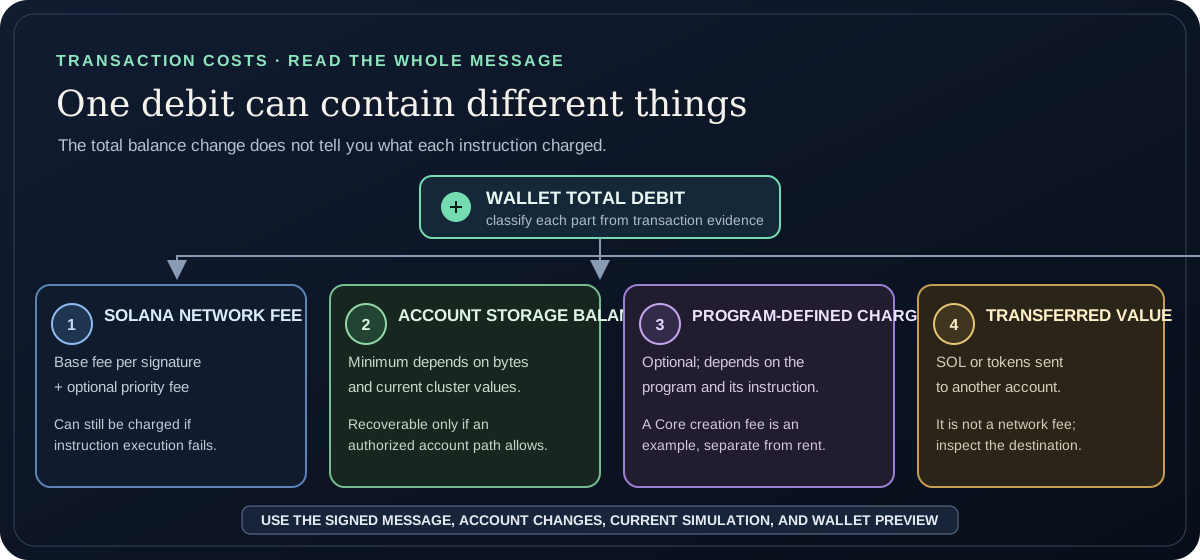
Separate the Solana network fee from account storage and any charge defined by a program. The current base fee is 5,000 lamports per transaction signature, but network parameters can change. For legacy and v0 transactions, an optional priority fee is the requested compute-unit price in micro-lamports multiplied by the requested CU limit, rounded up to lamports; it is based on the limit, not the compute actually used. V1 instead records a total priority fee directly in lamports. For example, two signatures at 5,000 lamports each plus a 200,000 CU limit priced at 250,000 micro-lamports per CU gives a 50,000-lamport priority fee and a 60,000-lamport Solana network fee. A failed transaction can still be charged this fee. A new data account also needs a minimum storage balance based on its allocated size. RPC still uses the historical name “rent-exempt minimum,” although this balance is not periodic rent; ask the selected cluster for the current amount. The balance is recoverable only through an authorized close or excess-withdrawal path that the account type supports. A program can also include a separate creation or protocol charge, such as the Metaplex Core asset-creation fee. A transfer amount is value moved, not a fee. The wallet’s total debit can combine all of these, so inspect the exact instructions, account deltas, and simulation instead of labeling every debit beyond the network fee as storage. Review the wallet’s final transaction prompt before signing.
Transaction formats changed in September 2026
Solana’s v1 transaction format became active across Mainnet, Devnet, and Testnet on September 15, 2026. It raises the size limit to 4,096 bytes; legacy and v0 transactions keep their 1,232-byte limit and continue to work. This is opt-in, so existing transactions are not obsolete. A reader must request support with the integer `maxSupportedTransactionVersion: 1`. V1 moves resource configuration into `transactionConfig`; read its priority fee as an absolute lamport total, while legacy/v0 derive it from a micro-lamport compute-unit price and requested limit.
Check v1 support across the whole client path
A readable v1 transaction depends on support at several separate points. As of 2026-09-29, Solana lists `@solana/kit` 8.0 and Rust crates 4.2 as able to read and send v1; `@solana/web3.js` 1.x 1.99 can read but cannot build, sign, or send it; and 3.x 3.0.0-rc.3 can. Before sending, the wallet must advertise version `1` in `supportedTransactionVersions`. RPC compatibility also matters: Agave nodes earlier than 4.2.2 can store v1 transactions as v0 and zero their resource configuration. Record the SDK, wallet capability, RPC implementation/version, and `maxSupportedTransactionVersion` request. If those disagree with the signed wire format or `transactionConfig`, cross-check the provider instead of calling the transaction malformed or missing. When a required component lacks documented support, stay with legacy/v0 if the payload and program permit.
A detail worth keeping.
An RPC acknowledgement says the request reached that service. A signature status answers a different question. A transaction can be temporarily absent from a node’s recent cache, become visible later, expire, or have been replaced. Track the signature and blockhash context before deciding what the learner should do.
Work through an example
Worked example: two transaction signatures at the currently documented 5,000 lamports each cost 10,000 lamports in base fees. A requested limit of 200,000 CU at 250,000 micro-lamports per CU adds 50,000 lamports in legacy/v0, for a 60,000-lamport network fee. In v1, the message carries the total priority fee in lamports. Account storage and a program-defined creation charge are separate; a transferred amount is not a network fee. Use current cluster parameters and the exact transaction simulation rather than treating this example as a quote.
Draw the transaction states prepared → signed → submitted → confirmed → finalized, with failed, expired, and unknown branches. Calculate the example network fee from two signatures, a 200,000 CU limit, and a 250,000 micro-lamport CU price. Then identify which evidence separates the account storage balance, any program-defined creation charge, and transferred value; explain why an unknown result must not trigger a duplicate mint.
GUIDED PRACTICE · BASIC
Do the work, one step at a time.
Use fictional addresses and disposable test data. Do not enter a recovery phrase or private key. Most exercises work on paper or with a local test; only a lesson that clearly says “read-only Devnet” makes a public network request.
- Prepare a transaction state diagram.
- Add timeout, expiry, failure, and confirmation branches.
- Calculate the legacy/v0 example fee, then explain how v1 represents a priority fee as an absolute lamport total.
- Write down the signature, cluster, commitment, and last valid block height.
- Classify a null status as pending evidence until expiry or a conclusive result.
- From the official v1 example, record SDK support, wallet-advertised versions, the reader’s maxSupportedTransactionVersion, and the RPC support evidence; report any missing capability instead of guessing.
Before you move on, check your reasoning
- Sketch success, error, expiry, and unresolved states; name the evidence needed to move between them.
- Calculate a legacy/v0 network fee from signatures and the requested compute limit, then contrast the v1 total-priority-fee field.
- Classify the storage balance, program charge, and transfer value; explain what a failed transaction can still cost.
OPEN SELF-CHECK · UNGRADED
Pause and test your reasoning
A transaction fails during execution after it was submitted. Which ledger outcome should you expect?
Reveal one best answer and its explanation
One best answer: The transaction’s requested state changes are rolled back, but its network fee may still be charged.
Solana executes transaction instructions atomically, so a failed transaction does not keep the requested partial state changes. The fee is charged for processing the failed transaction. Confirm execution status rather than treating RPC acceptance as success.
Sources: Transactions · Fee Structure
This practice is not scored, saved, or part of a certificate. Account-based lesson checkpoints and level exams remain separate.
Never enter a recovery phrase or private key into a learning site or lesson exercise.
READ THE SOURCE
Go deeper in the official docs
Reviewed on 2026-09-29. Protocol documentation can change; check the linked page’s current version as you use this material.
OPEN LEARNING
Keep learning at your own pace.
This lesson, its guided practice, and all six course lessons are open to everyone. Account-based checkpoints, exams, and saved progress will open when free accounts are ready.
Continue to the next lesson ↗