This guide is educational, not personalized financial, legal or security advice. A checklist reduces avoidable mistakes; it cannot make a transaction risk-free.
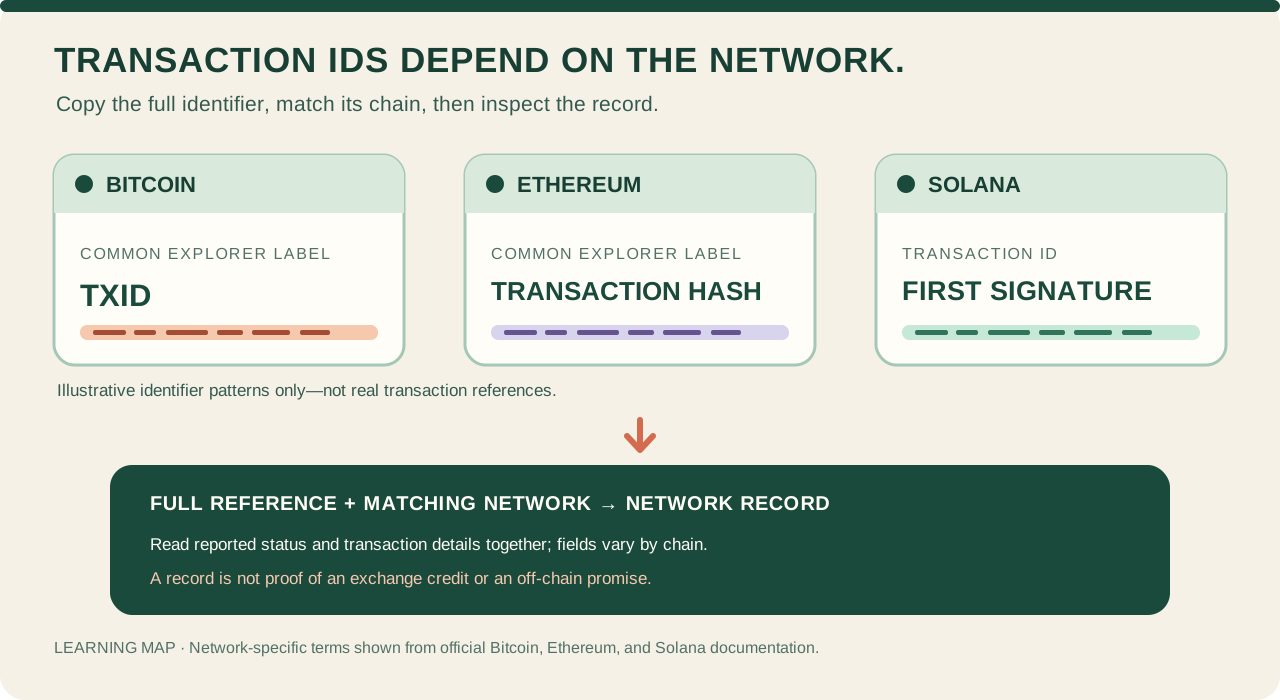
Fictional identifier patterns, not live IDs. A lookup shows network-specific record data; it does not by itself prove an exchange credit or an off-chain promise.
- Copy the full transaction reference from the wallet or provider's activity; distinguish an internal provider reference from an on-chain identifier.
- Identify the exact network or cluster. Bitcoin TXID, Ethereum transaction hash, and Solana transaction ID have chain-specific labels.
- Open a trusted explorer for that same network and look up the complete reference.
- Read the reported status and transaction details together; verify any separate exchange or merchant credit outside the chain.
A fictional transfer reference returns no result while the explorer is on another network. What should you check first, and what does the blank result not prove?
A crypto transaction hash—also called a transaction ID, TXID, or, on Solana, a transaction signature—is a reference you can use to look up a transaction on a particular network. The names are not identical across chains. The reference helps locate a network record; by itself, it is not proof that an exchange credited your account or that a seller kept a promise.
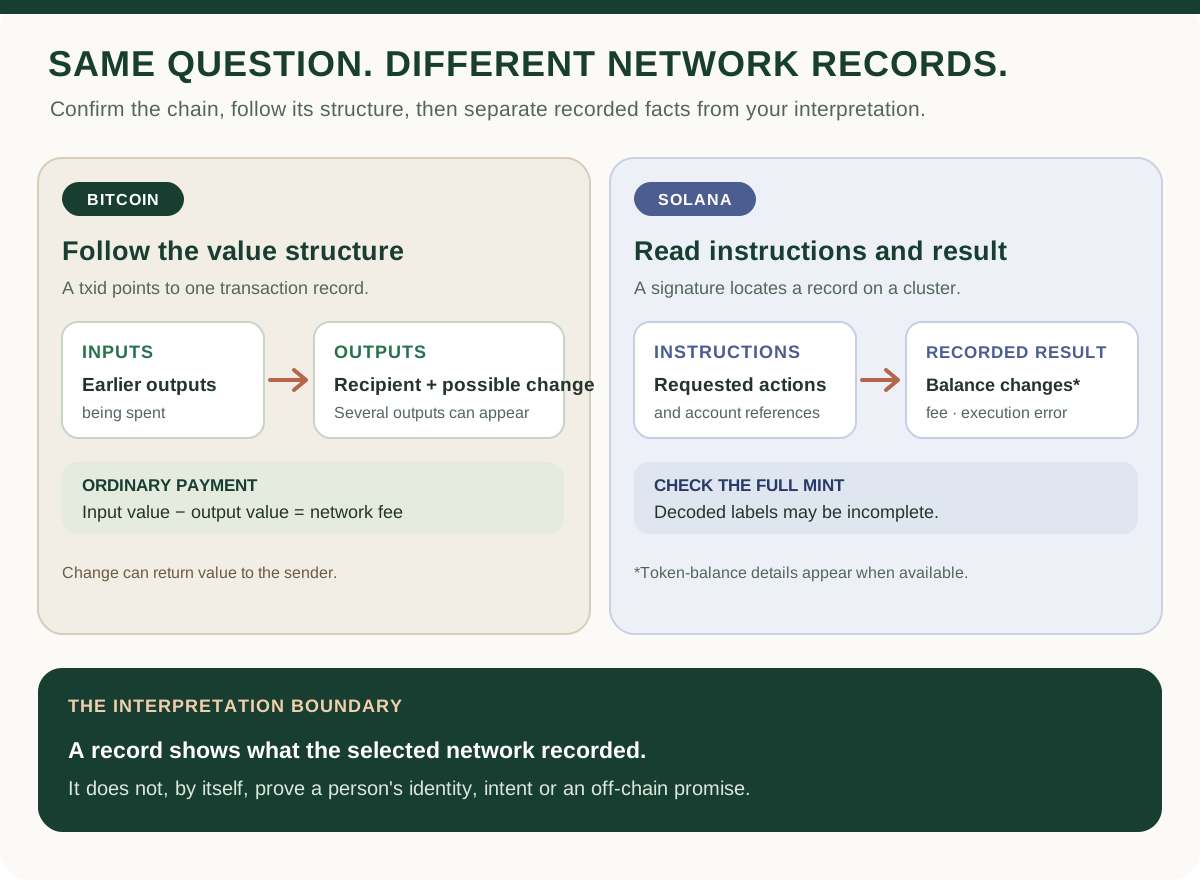
One idea, different network labels
On Bitcoin, wallets and explorers commonly call the reference a transaction ID or TXID. Bitcoin also uses a TXID together with an output number to point to a particular output from an earlier transaction. On Ethereum, the familiar label is transaction hash; Ethereum's transaction documentation shows a hash generated for a signed transaction. On Solana, the transaction ID is the transaction's first signature, encoded as Base58.
These labels are chain-specific. Do not decide which network a string belongs to just because it is long or resembles another identifier. Use the network or cluster from the original action to distinguish the record you meant to inspect; an identical-looking reference elsewhere is a different lookup context.
Find the network reference, then look it up
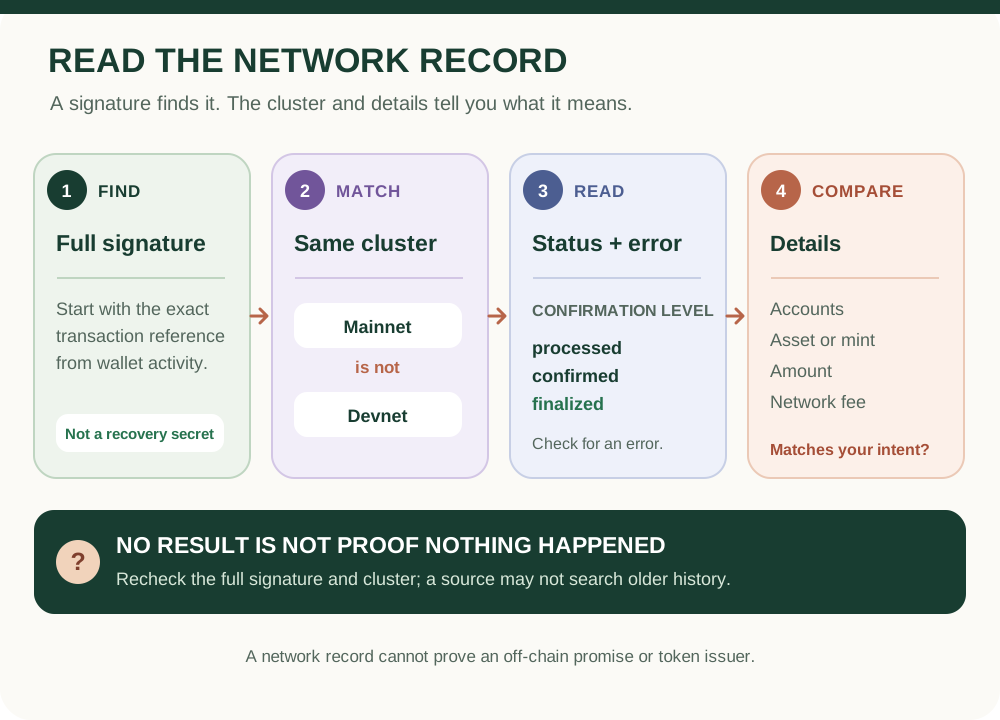
1. Open the wallet or provider's own activity for the action. Find a field labeled transaction ID, TXID, transaction hash, signature, or a link explicitly identified as an on-chain transaction. 2. Check whether the action was submitted on-chain. A provider can first move funds inside its own account system; that internal activity may have a provider reference rather than a public blockchain transaction ID. 3. Copy the full reference and confirm the network or cluster shown by the wallet or withdrawal details. Do not trim characters or reuse an explorer link from an unsolicited message. 4. Open a block explorer you reached independently and select the matching network. Search the exact reference, then read the reported status and the transaction details together. For help interpreting the fields, see how to read a transaction in a blockchain explorer.
For Solana specifically, a signature lookup is cluster-specific; the Solana transaction-check guide explains what to check when a Mainnet or Devnet result is missing.
What the result can—and cannot—tell you
A matching explorer or node response can help you inspect the record available for that network: for example, its reported inclusion or execution status, participating addresses, asset movements, and fees. The exact fields and status terms vary by chain and service. A submitted or pending transaction is not the same as an included or successful transaction; consult the relevant network guide for those stages.
The lookup does not tell you why someone acted, identify the person behind an address, or confirm that a separate exchange or merchant credited an internal balance. If a recipient is a custodial service, its deposit policy and account records are separate evidence. A transaction reference is public data, so sharing it can make the associated activity easier to connect, even though it is not a wallet password or recovery phrase.
If the search returns nothing
A blank result has several possible explanations: the wrong chain or cluster, a copied reference with a missing character, an action that has not been broadcast as an on-chain transaction, or a lookup service that has not returned that record at the time of your search. Ethereum's JSON-RPC documentation notes that a receipt is not available for a pending transaction; Solana's getTransaction method can return null when a transaction is not found or has not reached the requested commitment. An empty search is not enough to conclude that funds are lost—or that it is safe to send the action again.
Recheck the full reference and network in the original wallet or provider. If the service says it has not yet broadcast an on-chain withdrawal, ask that service through its independently opened support channel for its status and provider reference. Do not share a private key, recovery phrase, password, or one-time code with anyone offering to “trace” the funds.
Practise with a fictional transfer
A fictional wallet entry shows a transaction reference, while an explorer is set to a different network and displays no result. First match the network and search the full reference. Even after a record appears, separately check what the record says and whether the receiving service has credited its own account. No real wallet, transaction, or payment is needed for this exercise.
For the larger sequence from authorization to network history, continue with how blockchain works or compare Bitcoin, Ethereum, and Solana.
Check your understanding.
A wallet gives you a transaction reference, but the explorer says not found. What is the best first check?
A correct answer records local learning progress, not a qualification or proof of financial readiness.
Put this lesson in context
Start with how the technology works, then separate assets, accounts and wallet control.
Sources & context
- Bitcoin Developer Guide — Transactions ↗Consulted 2026-10-11
- ethereum.org — Ethereum transactions ↗Consulted 2026-10-11
- ethereum.org — JSON-RPC API: transaction lookup and receipts ↗Consulted 2026-09-30
- Solana Documentation — Terminology ↗Consulted 2026-10-03
- Solana documentation — getTransaction RPC method ↗Consulted 2026-10-11
Original educational content prepared for this project. Sources provide context, not endorsement or a guarantee that every statement remains current. Rules, product interfaces and availability can change.
Keep learning in Telegram.
Open this published guide in the learning bot. No account connection or wallet is needed.
Join the $STONKB community.
Follow project updates, share useful ideas and meet other builders. You do not need to buy $STONKB to join.
Take what you learned.
Leave the pressure behind.